pokitcrew

Built by a sparky who was wearing every hat

Stop wearingevery hat inthe business.

Pokitcrew is a crew of five who take the other hats off you: phones, invoices, orders, paperwork, socials. You stay on the tools, and knock-off is actually knock-off. Ring one right now and see for yourself.

Answering real customer calls every dayBuilt by a sparky, on the toolsWorks with XeroAny voice, any accentNights · weekends · public holidaysNothing goes to a customer without your say-soSWMS & risk assessments, done properlyLogins for your field crew — job sheets, timesheets, leaveBooked by suburb — the van's already nearbyAsset stickers your customers can scanSparkies · plumbers · fridgies · HVAC · buildersTrade-specific — COES, ARC records, the lot$69 a week — the whole crewNo lock-in contractAnswering real customer calls every dayBuilt by a sparky, on the toolsWorks with XeroAny voice, any accentNights · weekends · public holidaysNothing goes to a customer without your say-soSWMS & risk assessments, done properlyLogins for your field crew — job sheets, timesheets, leaveBooked by suburb — the van's already nearbyAsset stickers your customers can scanSparkies · plumbers · fridgies · HVAC · buildersTrade-specific — COES, ARC records, the lot$69 a week — the whole crewNo lock-in contract

The crew · five of them

Pick up the phone and test one.

These aren't videos of a demo. Ring one, ask it something awkward, try to trip it up. That's the whole point.

Not sure where to start? Start with Ringo — most blokes do. The rest are already in the price; switch each one on whenever you're ready.

The Receptionist

Ringo Starr

Answers every call on the first ring, books the job into your real calendar and takes a proper message. You stop losing work to voicemail.

  • Picks up on the first ring, 24/7
  • Books into your real calendar
  • Messages you'd actually action
Everything Ringo does

The Money Man

Johnny Cash

Talk the job through on the drive home and the quote or invoice is in Xero before you're in the driveway. Then he chases the money.

  • Priced off your list, not a guess
  • Straight into Xero, properly
  • Chases the money you're owed
Everything Johnny does

Your Personal Assistant

Cathy Freeman

Runs your day. Your inbox, your diary, your to-do list, your materials orders — and she remembers every conversation you've ever had.

  • Sorts your inbox and your diary
  • Orders your materials properly
  • Remembers every conversation
Everything Cathy does

The Safety Officer

George Forman

Does your risk assessment on the way to site and writes the SWMS off the back of it. Knows the standards better than the bloke inspecting you.

  • Risk assessment first, SWMS second
  • Site-specific, not a template
  • Answers from the real standards
Everything George does

The Socials Guy

Post Malone

Turns the photos already on your phone into posts, picks the right ones, and asks before anything goes out. Your socials stop being dead.

  • Uses your real job photos
  • Nothing goes out unapproved
  • Facebook, Insta, Google, blog

Live demo line — ring it right now

Call the crew.

(03) 9022 6563

You'll be handed a made-up trade business and the crew works for you — quotes, the diary, safety, the lot. Ring back tomorrow and they remember you. It costs nothing, nothing is real, and they only ever message you.

Texts go to 0468 179 419 — the crew answers those too.

What to try on the call

  • Ask for a quote Johnny prices it up and a proper-looking one lands in your inbox.

  • Say “put me through to the money side” and hear the call handed over mid-conversation.

  • Get George to run a SWMS a real safety walkthrough, done by phone like you're on site.

  • Ask Cathy what's on this week she's across the diary and every job on the board.

  • Text 0468 179 419 the crew answers texts too, same brain, same memory.

  • Then just hang up your transcript arrives by text a few seconds later.

One board, one glance

Everything they do lands in one place.

The dashboard is where the crew's work lands — what came in, what's waiting on you, what's booked, what's been paid. Open it on the ute bonnet with one hand. Every picture below is the real thing, running on a sample business.

app.pokitcrew.comLive dashboard · Sample data
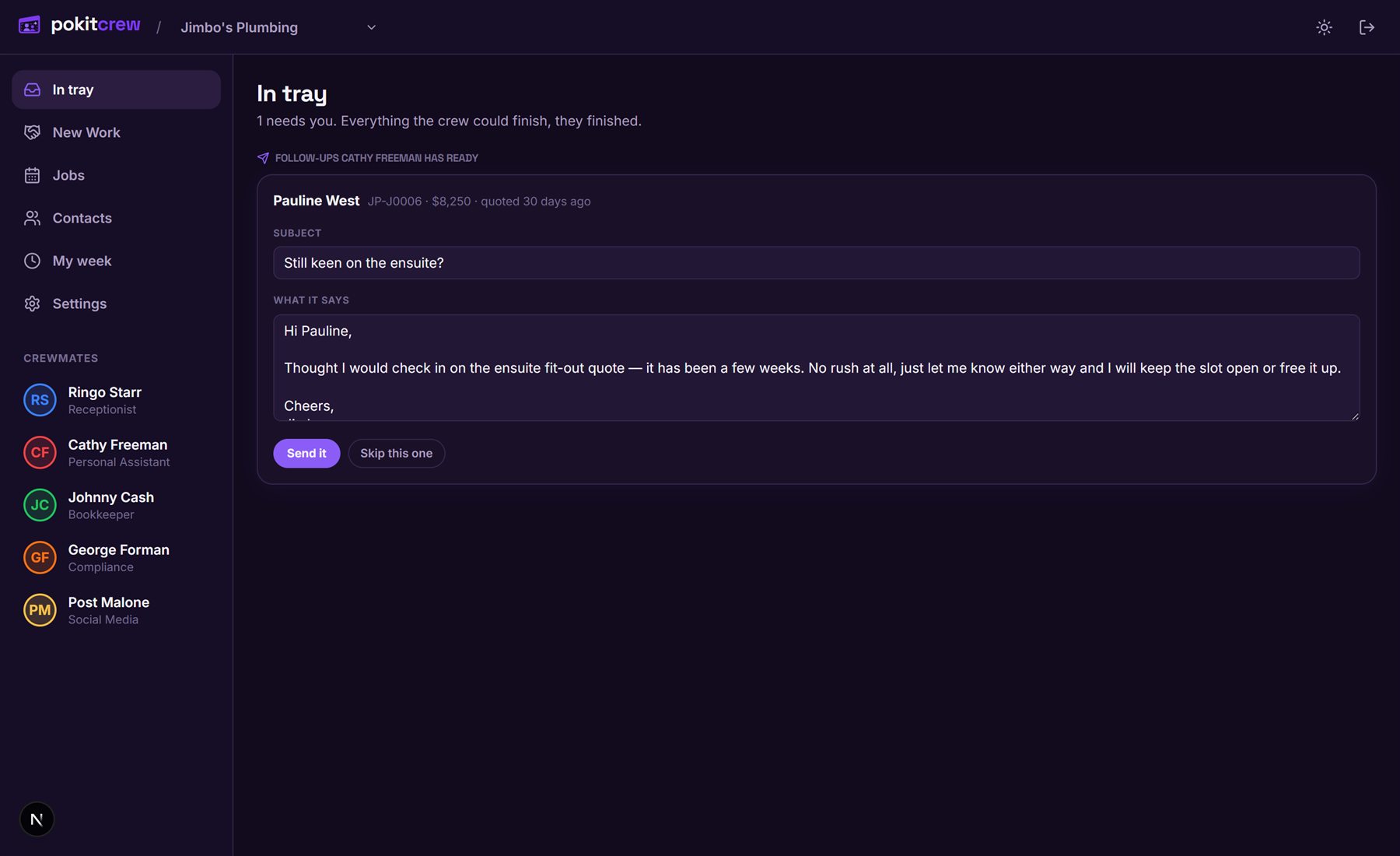
The in tray — the only screen you have to open
Waiting on you

The in tray — the only screen you have to open

Everything the crew needs a decision on, in one list. A quote's gone quiet, so Cathy's written the nudge — it sits here until you tap Send it. Nothing goes to a customer until you've said so.

  • Approvals pinned at the top — invoices, follow-ups, posts, orders
  • Overnight calls and messages with what was said and how urgent it is
  • Everything the crew could finish themselves, they finished
See the whole thing

Fresh off the tools

What's new on the board.

Pokitcrew is built inside working trade businesses, so it grows the way a business does — a hat at a time. Here's what the crew has picked up lately. It's all included — switch on what you want, ignore the rest.

Your crew

Logins for the whole team

Owner, office, and on-the-tools — three kinds of login, three views. Your office sees the boards. Your field crew see their run and their job sheets. Nobody has to share your password, and nobody sees your books unless you say so.

Your crew

A job sheet, not a spreadsheet

Field crew open a job and get what they need on site: the address and directions, the checklist, the photos, the notes. One big button — "I'm here" — logs the arrival and starts the clock. Pricing stays hidden unless you switch it on for them.

Your crew

George bookends the job

A crew member rings George from the driveway: he runs the risk assessment and clocks them on in the same call. They ring again at the end: work done, materials used, hours — read back, confirmed, and the job card fills itself in.

Your crew

Timesheets & time off

Hours clocked on jobs land on the timesheet by themselves. The crew add the odd workshop hours, hit submit, done. Leave gets asked for in the app, you approve it in one tap, and the roster blocks them out automatically.

Bookings

Booked by urgency, not by luck

A caller says "there's water coming through the ceiling" and Ringo knows that's today, not Thursday week. Faults get sized up in the caller's own words for your trade — emergencies get the first gap and you get told immediately.

Bookings

Booked by suburb, not by chaos

When Ringo offers times, he looks at where your vans already are that day and offers the gap that keeps the run tight. Less criss-crossing the shire, more jobs in the same day. The day view shows the whole run on a map.

Bookings

A calendar for every van

Set up a work calendar per van or crew and the day becomes lanes. A tech calls in sick? Swap the person on the lane — the day's bookings don't move. Techs can get their own bookings pushed into their personal calendar too, if they want them.

Bookings

"Move Wednesday's job to Thursday"

Say it exactly like that. The crew find the booking from your words — or a customer's, when they ring up about "the appointment for the powerpoint" — move it to a sensible new time, and let the customer, the crew and you all know.

On site

An asset register with QR stickers

Every unit you look after gets a number and a sticker. Your crew scan it and get the full service history on the spot. The customer scans it and gets your branded book-a-service page — the fault arrives already linked to the right unit, site and customer.

Money

Deposits & progress payments

Johnny takes the deposit the moment a quote's accepted — your percentage, straight into Xero. Big job? Progress claims partway through. The final invoice nets everything off so nobody's ever double-billed.

Money

Quotes that chase themselves

A quote goes quiet and the crew drafts the nudge — at two weeks, four, then a last word — each one waiting for your OK. The moment the customer replies, the chasing stops dead. Six weeks of silence files it as not won; reopen it any time.

Money

A quote sheet worth signing

Every quote goes out on a branded sheet with your logo, your colours and your trade's artwork. For the big jobs there's the premium pack: your photos, your story, the brands you install — a proper document over a few pages, not a bare table.

The office

Every call, on paper

Every finished call turns into an emailed report — who rang, what they wanted, what the crew actually did, and the full transcript. Nothing that happened on the phone lives only on the phone.

The office

Scotty Cam runs the help desk

The newest crewmate. Ask him what anything does and he answers from how your business is actually set up. Tell him "change my quotes to say 5 years warranty" and he changes the setting for you — and if you hit a bug, he files it straight to us.

The office

"I hate technology" is a setting

Three sizes of dashboard. Simple is two big buttons and today's jobs. Standard adds the pipeline and contacts. Advanced is the lot. It's a preference, not a paywall — change it whenever, and everything still works by phone regardless.

Getting started

Four steps. We do three of them.

01

Start where it hurts

The whole crew's included, but you don't have to run them all on day one. Most blokes put Ringo on the phones first — that's the hat that interrupts you all day — and switch the others on when they're ready.

02

We plug them into your gear

Your number, your Xero, your calendar, your inbox, your socials. Run ServiceM8 or Simpro? We plug the crew into that too. The setup is done with you on a call — there's no new app for your customers to learn.

03

You set the rules, they do the work

Live calls follow rules you approve up front — where you go, what you charge, when to put someone through. Everything else that leaves the building — invoices, texts, orders, posts — waits for your individual yes.

04

It all lands in one place

Calls, jobs, quotes, money, paperwork — one board you can read at a glance from the ute. That's the dashboard.

Made to measure

Built around your trade.

A crew that doesn't know your trade is just another app. This one comes wired for yours — and when your trade needs something we haven't got, we build it.

Your trade's paperwork, built in

Pick your trade and the crew shows up knowing it. Sparkies see a COES line on every job card — no other trade does. Fridgies get ARC refrigerant records. Plumbers get pressure tests. Your compliance, not everyone's clutter.

Missing something? Say the word.

The whole system is built for fast changes. If your trade needs something specific, tell us and we'll build it — quick — because if you need it, every other roof plumber, fencer or fridgie does too. That's exactly how COES got in.

Safety and regs, handled

SWMS, risk assessments, standards questions — the paperwork that stops you working and the fines that sting. George runs the risk assessment properly, writes the SWMS off the back of it, and answers regs questions from the actual standards.

Already on ServiceM8 or Simpro?

Keep it. We plug the crew into the job system you already run — the phones, the socials and the paperwork work on top of it, and your board slims down to just the bits they add. No double entry, no switching.

In the workshop

Quoted off the plan. Coming soon.

The next big thing: upload the builder's plans and walk away with a priced quote. The first two are already quoting real jobs inside the businesses Pokitcrew was built in — they roll out to everyone once we've knocked the edges off.

Ducted heating & cooling

Quoting real jobs now

Upload the floor plan. The rooms get read off it, the vents and duct runs laid out, the unit sized for the house, and the whole thing priced at your rates — with the marked-up plan attached to the quote. Drag anything you'd do differently and it reprices.

Electrical, off the plan

Quoting real jobs now

Builders' plans in, every GPO, light, switch and smoke detector counted off the drawings, cross-checked against the plan's own schedules, and priced per point off your own rate card. One total, every item listed, the workings shown.

Plumbing, off the plan

Next in line

The same treatment for rough-ins: fixtures counted off the plan and priced from your rates, with anything the plan doesn't say flagged as a question instead of a guess.

A portal for your bigger customers

Rolling out with first clients

Hand a facilities manager their own branded page: their asset register, service history and compliance due dates — and a fault lodged in fifteen seconds by scanning the sticker on the unit. No app, no login, no phone call.

Want one of these first, or need something your trade can't live without? Tell us — the whole system is built for fast changes, and if you need it, so does every other business in your trade.

Plugs into

Works with what you've already got.

The crew work inside your accounts, not a copy of them. Connect what you use; ignore what you don't.

Available now

  • Xero
  • Pylon (solar)
  • Gmail
  • Microsoft 365 email
  • Google Calendar
  • Outlook calendar
  • Facebook
  • Instagram
  • Google Business Profile
  • Your existing phone number

Coming soon

  • ServiceM8
  • Simpro
  • Xero Payroll (timesheets)

For solar installers

Design it in Pylon. The rest happens here.

Pylon is where the system gets designed and the proposal gets sent — shading, battery sizing, a proper document out the door in minutes. Keep doing exactly that. Pokitcrew picks the job up from there, so nothing gets typed twice and no proposal goes quiet.

Have a look at Pylon
app.pokitcrew.com / new workLive dashboard · Sample data
Read-only

What the link-up actually does

  • Your projects land on the board

    Customer, address, system size and price come across as real jobs. You'll see everything that's already in Pylon before a single row is imported.

  • Quoted means quoted

    The moment a proposal goes out of Pylon, that job sits in Quoted with the kilowatts, the battery and the ex-GST figure on the card.

  • Signed in Pylon, sold here

    E-signed or marked won, and the job moves itself to Sold and carries on into scheduling, deposits and invoicing. Switch that off if you'd rather move them yourself.

  • Nobody quotes the same job twice

    Johnny checks Pylon before he prices anything. If a proposal has already gone out, he says so instead of writing a second one.

  • One click back to the design

    Open the project in Pylon straight off the job card when you want the drawings or the numbers.

Read-only, and yours to switch off. You paste your own Pylon key into your settings — we never ask you to hand it to a human — and you can disconnect it any time. We read from Pylon; we never write into it.

Solar only shows up for solar businesses. Nobody else ever sees a kilowatt.

Our story

I didn't build a product. I built my way out.

I'm Mick. I'm a sparky. A few years into running my own show, I realised I hardly did any sparky work — I was the receptionist, the bookkeeper, the scheduler, the safety officer and the marketing department, and I did most of it after a full day on the tools. Quotes at 11pm. The after-hours texts that never stop — the ones that kill tradies. And it wasn't just my hats: my own staff came to me with everything, because every answer in the business lived in my head.

So I spent months building myself a crew. One by one: someone on the phones, someone on the invoices, someone on the orders and the inbox, someone on the safety paperwork, someone on the socials. Not to replace me — to let me be an electrician again. Work hours went back on work that pays. Knock-off went back to being knock-off, because the crew has the phones.

The proof it worked? We hooked up the caravan and went around Australia for seven weeks. Seven weeks. The crew kept working — and so did my real staff, because for the first time they had somewhere to get answers that wasn't me. Calls answered, jobs booked, invoices out, paperwork done, nobody waiting on the boss.

Then I looked around at my mates — fridgies, plumbers, roof plumbers, fencers — all drowning under the same hats I'd just taken off. So I packaged the crew up for them. That's Pokitcrew.
The proof7 weeks away
663

Calls answered

Last three months, every one picked up

92

After hours

Nights, weekends and public holidays

1,400+

Texts handled

Across 200 customer conversations since late May

277

Emails handled

Read, triaged and dealt with since June

72

Social posts

Published since April — Mick wrote none of them

70+ hrs

Handed back

Call time, plus texts and emails counted at honest two-finger typing speed

Real counts pulled from the crew's own logs in the sparky business it was built in, 2 August 2026. Not projections.

Your data

Your business isn't our training data.

Your calls, customers, prices and job information stay yours. Each crewmate only touches what their job needs — through permissions you grant and can pull at any time — and nothing you give us trains anyone's models. Leave, and your data leaves with you.

The full rundown — where it lives, who sees it, what happens if something goes wrong
  • Your tools stay yours — Xero, email and calendar connect by permission, revocable from your own account in one click
  • Calls are recorded and transcribed for your records, not ours — deleted when you say so
  • Export the lot and have it deleted when you leave

What actually changes.

Traditional setup

With a crew

Five separate tools

One connected crew

You move information between them

Crewmates hand work to each other

Forms and dashboards

Phone, text or dashboard

Generic workflows

Trade-specific paperwork

Paper timesheets in the glovebox

Clock on from the driveway

Booked in the order they rang

Booked by urgency and suburb

Work stops after hours

The crew keeps working

No waffle

Straight answers.

01Will my customers know it's not a person?

Some will pick it, most won't. If anyone asks — however they ask it — the crew gives it to them straight: they work for the business, and they're not a human. They are never allowed to claim to be a person. That's a hard rule, not a setting.

02What if it stuffs something up?

Two layers. Live calls only ever follow rules you approved up front — service area, prices, when to escalate. And anything else that leaves the building — an invoice, a text, a post, an order — waits for your individual yes. You're the one who presses send.

03Do I have to change my phone number?

No. We divert your existing number, and you keep it. You can send the crew every call, only the ones you don't pick up, or only the after-hours ones.

04I've got staff — does this work for them?

Yes — everyone gets their own login, sized to their job. The office get the boards. The crew on the tools get their run and their job sheets: directions, checklist, photos, a button that clocks them on. They don't see your pricing unless you switch it on, and their timesheets and leave run through the same app. One bloke or ten, same system.

05I'm not a computer bloke.

Neither is the bloke who built it. You talk to your crew the same way you talk to a person — on the phone, or by text. The setup is done with you on a call, not by you in a settings screen.

06What if I want to take over a conversation?

Jump in any time. Reply to the customer yourself and the crewmate steps back and shuts up until you're done. Everything you said is in their memory, so they don't contradict you afterwards.

07What does it cost?

$69 a week, billed monthly at $299 — that's the whole crew of four and the dashboard. Post runs your socials for $49 a month on top if you want him. No lock-in, no setup fee, and fair use covers what a normal trade business gets through. The full breakdown is on the Crew plan page.

08I'm not a sparky.

Doesn't matter. Plumbers, fridgies, HVAC, builders, chippies — the crew learn your trade, your price list, your suppliers and your paperwork. The compliance side gets set up for your trade and your state, and if your trade needs something we haven't built yet, we build it.

Take a few hats off.

Here's the whole deal: $69 a week for the crew, billed monthly. Tell us how your business works — by voice or by form — connect your tools, switch them on. Most blokes start with Ringo; the rest are already included when you're ready.

Sign my crew up